CXR-L(EN)
CXR-L(EN)
IntroductionQuick StartDevelopment Flow & State-MachineTerms and Abbreviations
Feature Development
Version HistoryAndroid
iOS
cxr-l-sdk · v1.0.3 · snapshot 2026-06-02· ↗ source
SDK Import
SDK Import
This chapter takes the use of Kotlin DSL (build.gradle.kts) as an example
Configure Maven Repository
The CXR-S SDK utilizes Maven for online management of SDK packages.
Maven repository address: (“https://maven.rokid.com/repository/maven-public/”)
Locate the settings.gradle.kts file and add the Maven repository to the repositories section within the dependencyResolutionManagement node.
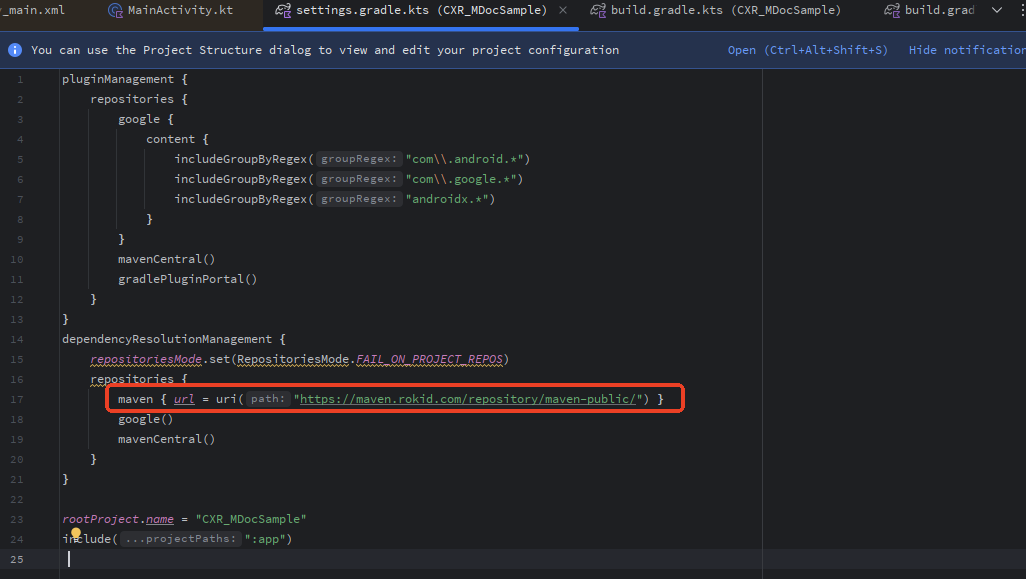
pluginManagement {
    repositories {
        google {
            content {
                includeGroupByRegex(“com\\.android.*”)
                includeGroupByRegex(“com\\.google.*”)
                includeGroupByRegex(“androidx.*”)
            }
        }
        mavenCentral()
        gradlePluginPortal()
    }
}
dependencyResolutionManagement {
    repositoriesMode.set(RepositoriesMode.FAIL_ON_PROJECT_REPOS)
    repositories {
        google()
        maven {
            url = uri(“https://maven.rokid.com/repository/maven-public/”)
        }
        mavenCentral()
    }
}

rootProject.name = “CXRServiceDemo”
include(“:app”)
Dependency Import
CXR-S SDK Package (“com.rokid.cxr:cxr-service-bridge:1.0-20250519.061355-45”).
Add the dependency in the dependencies node of the build.gradle.kts file.
Note: The SDK requires setting minSdk ≥ 28.
//…Other Settings
android {
    //…Other Settings
    defaultConfig {
        //…Other Settings
        minSdk = 28
    }
   //…Other Settings

}
dependencies {
   //…Other Settings
    implementation(“com.rokid.cxr:cxr-service-bridge:1.0-20250519.061355-45”)
}